Discord Color Codes List: The Complete Master Directory
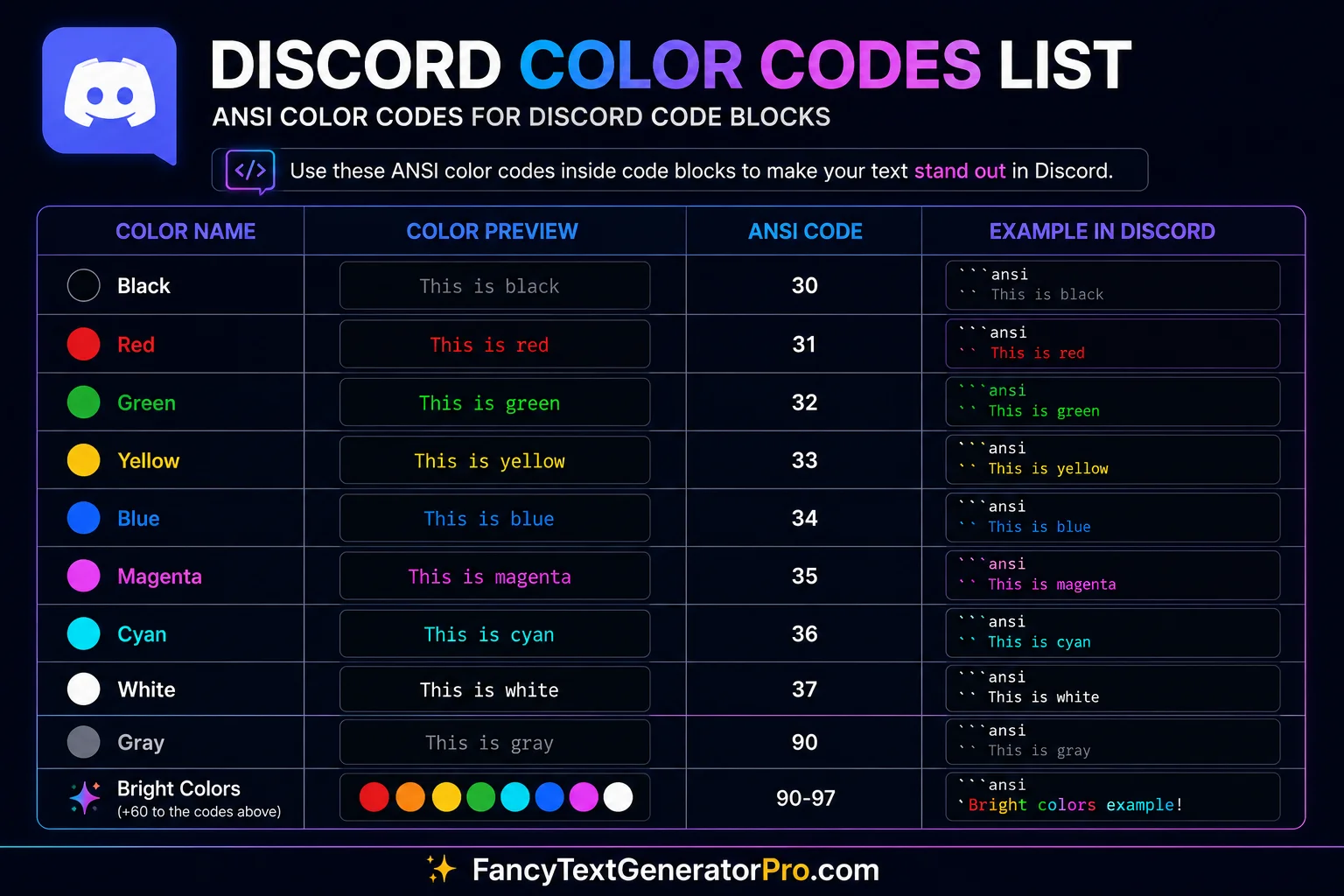
Finding the exact code to change your text color in Discord shouldn’t require reading through developer documentation. Whether you are managing a massive gaming server, structuring roleplay community rules, or just trying to make your chat messages stand out, you need a quick, reliable reference sheet.
This comprehensive directory provides every functional Discord color code powered by Markdown formatting and syntax highlighting.
Need a beginner’s introduction first? Read our step-by-step tutorial on How to Color Text in Discord.
For users who need multiple colors, background colors, or advanced formatting options, our Discord ANSI Colors guide explains how Discord’s ANSI formatting system works.
AEO Quick Reference: Top 5 Discord Color Codes
Don’t have time to browse? Here are the five most popular syntax highlighting combinations for instant copy-pasting:
Red Discord Color Codes
Red is universally understood as a warning or error color. It is highly effective for broadcasting server rule violations, critical bot alerts, or administrative announcements.
1. The Diff Red (Bright)
This is the most common red color code. It requires a minus sign (-) at the start of every line you want to color.
```diff
- This is bright red text
```
Green Discord Color Codes
Green symbolizes success, approval, and safe actions. Use these codes when announcing a newly promoted moderator, a successful giveaway, or an approved server suggestion.
1. The Diff Green (Bright)
The companion to the diff red, this bright green requires a plus sign (+) at the start of your message.
```diff
+ This is bright green text
```
2. The Bash Green (Classic String)
The bash syntax colors text inside quotation marks (" ") or apostrophes (' ') as a string variable, which renders as a solid green.
```bash
"This is classic green text"
```
Yellow and Orange Color Codes
Yellow is the ultimate highlighter color. Because standard Discord text is light gray, a sudden burst of yellow immediately draws the eye, making it perfect for server updates and patch notes.
1. The Fix Yellow (No Symbols)
The fix language is widely loved because it requires absolutely no trigger symbols. Everything written inside the code block automatically turns bright yellow.
```fix
Every word typed here will be bright yellow without any extra symbols!
```
2. Orange Discord Color Codes
While Discord does not provide a true orange text color through standard syntax highlighting, the CSS language syntax often creates an orange-red appearance. Many users use this formatting when they want a warmer alternative to bright red text.
```css
[This text appears orange-red in Discord]
```
Blue and Cyan Color Codes
Blue tones are calming, professional, and visually distinct from standard chat. They are often used for linking external resources, listing commands, or separating structural data.
1. The INI Blue (Header)
By wrapping text in square brackets [ ] using the INI syntax, you can generate a vibrant, readable blue.
```ini
[This is vibrant blue text]
```
2. The YAML Cyan (No Symbols)
Similar to fix, the YAML language automatically colors regular text without requiring special symbols, rendering a beautiful cyan.
```yaml
This text automatically turns into a cool cyan color
```
Limitations of Syntax Highlighting (And The Solution)
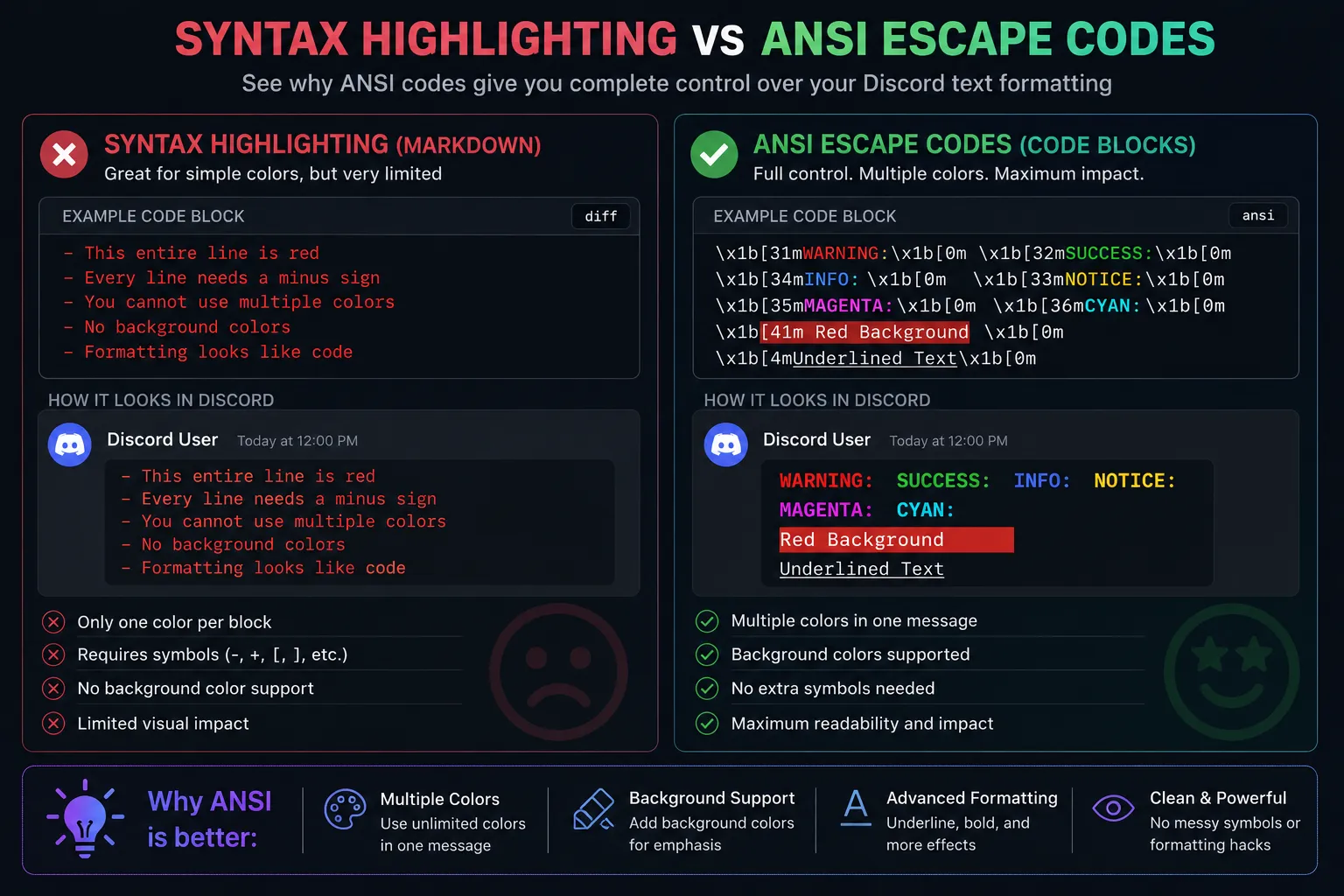
While Markdown syntax highlighting is incredibly useful for quick formatting, it has severe limitations:
- You cannot stack colors: A single word cannot be red while the next word is blue inside the same block easily.
- You cannot change backgrounds: Markdown syntax only changes the foreground text color.
- It relies on formatting hacks: Having to type minus signs and brackets can disrupt the readability of your announcement.
The Solution is ANSI Escape Codes.
In late 2021, Discord introduced support for the ANSI standard within code blocks. This revolutionized text formatting, allowing users to stack background colors, underline text, and color specific words without relying on diff or css hacks.
To learn the mechanics behind this advanced formatting engine, read our deep-dive guide: Discord ANSI Colors Explained.
Frequently Asked Questions
Are Discord color codes safe to use?
Yes. Discord color codes are a native feature built into the Discord client through Markdown and highlight.js integration. They do not require third-party bots, mods, or plugins, and will not get your account banned.
Why are my colors different on my phone?
Discord mobile apps sometimes render syntax highlighting themes slightly differently than the desktop application. However, the core colors (red, green, blue) will still visibly contrast against standard gray text across all platforms.
How do I combine multiple colors in one message?
To combine multiple colors seamlessly on a single line or paragraph, you must stop using standard syntax highlighting and transition to using Discord’s ANSI escape code system.
Explore the Discord Formatting Hub
- Discord Color Text Guide (Pillar)
- How to Color Text in Discord
- Discord ANSI Colors Explained
- Discord Code Block Colors