Fancy Text Symbols: How They Work and How to Use Them
Fancy text symbols can make a username, bio, caption, or message look different without installing a special font.
You may have seen text such as 𝓗𝓮𝓵𝓵𝓸, ʜᴇʟʟᴏ, ★ Hello ★, or H̎e̎l̎l̎o̎.
But how does this work?
The simple answer is that many fancy text styles use Unicode characters and character combinations. They are different from changing the font in a document or graphic design app.
This guide explains what fancy text symbols are, how they work, why some symbols look different on different devices, and how you can use them in everyday text.
What Are Fancy Text Symbols?
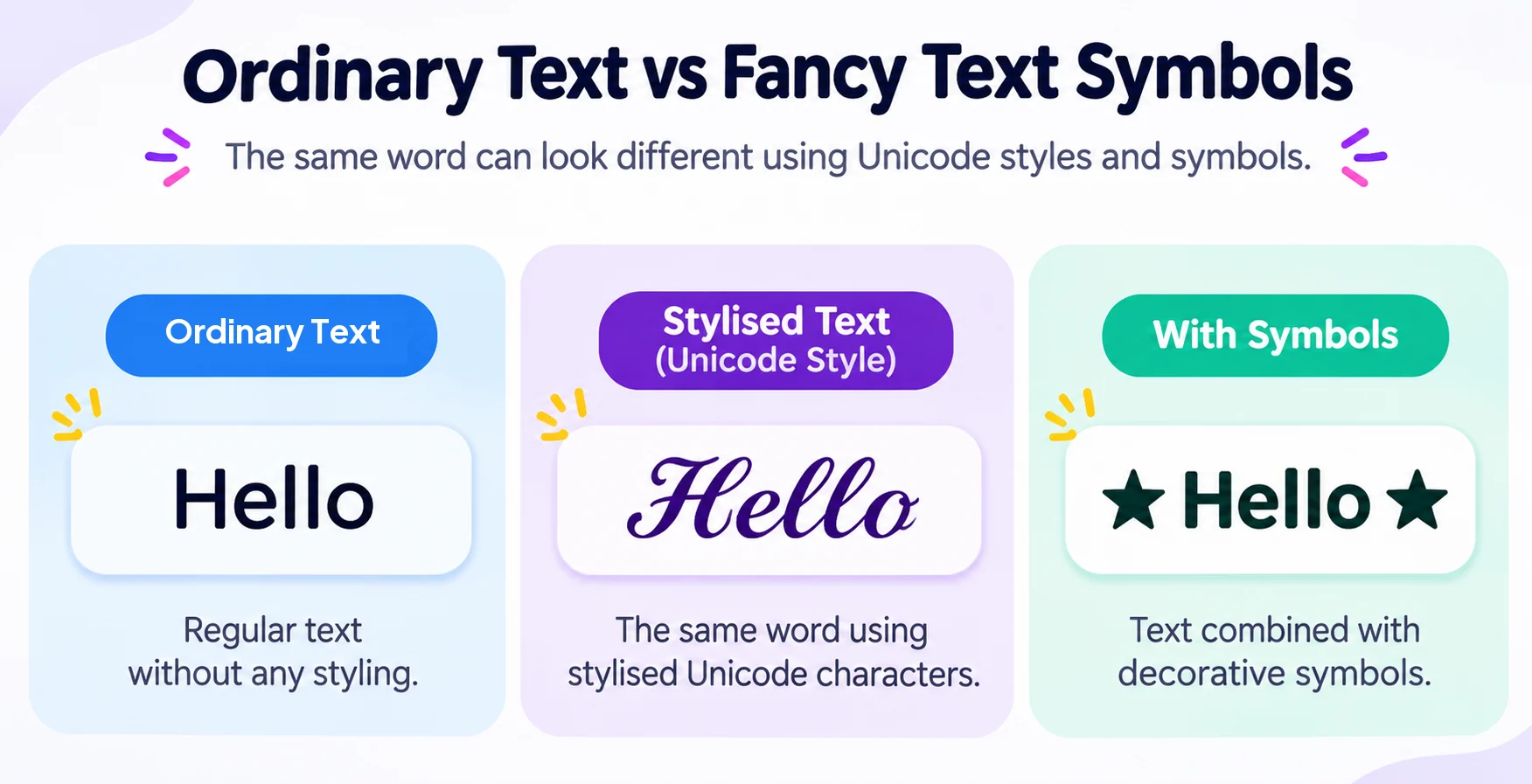
Fancy text symbols are Unicode characters or combinations of characters that can give ordinary text a different appearance.
- Plain text: Hello
- Stylised text: 𝓗𝓮𝓵𝓵𝓸
- With symbols: ★ Hello ★
- Another style: ʜᴇʟʟᴏ
The important thing to understand is that these are not simply different fonts applied to the same letters.
A normal font changes how a character is drawn. Unicode gives characters a defined identity that software can interpret and display.
Unicode is a standard for representing text and symbols across digital systems. It is not a font itself. The Unicode Standard defines characters and their encoding, while fonts and rendering systems determine how those characters appear on screen.
That is why you can often copy fancy text from one website and paste it into another app without installing a font.
There is no single Unicode block called “fancy text”. Different styles can come from different Unicode characters and character combinations.
How Do Fancy Text Symbols Work?
Your keyboard contains only a small part of the characters available in Unicode.
Unicode contains characters for many writing systems, punctuation marks, symbols, and other forms of digital text. Some characters can also be combined with other characters.
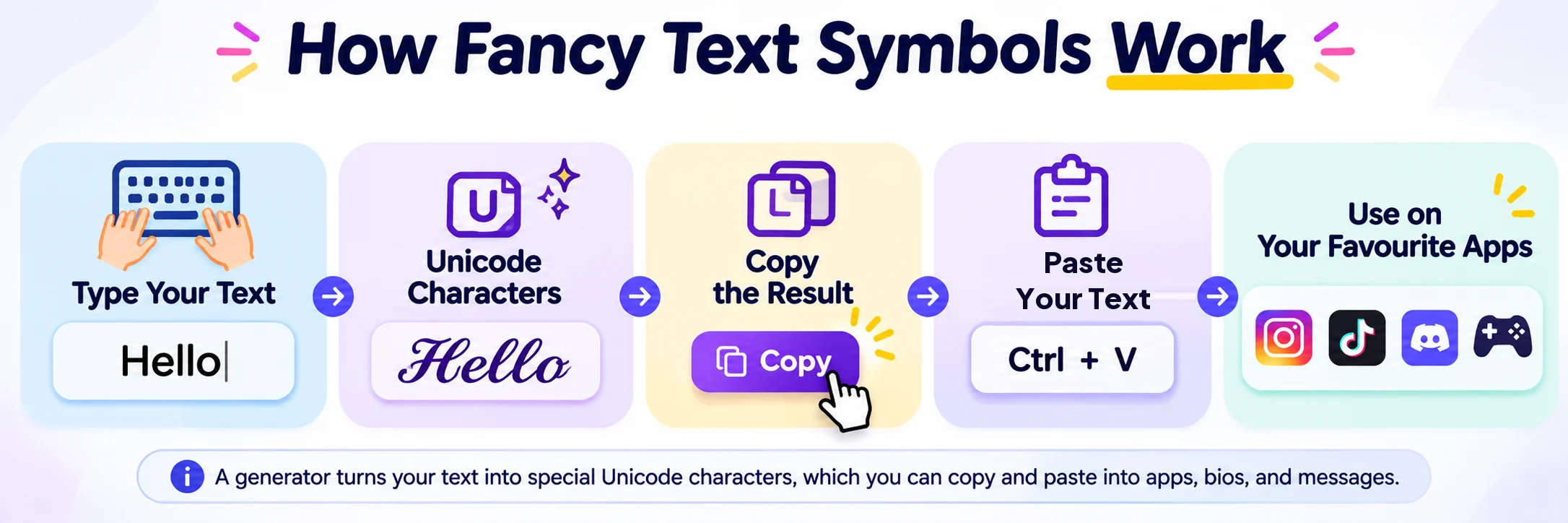
When you type a word into a fancy text generator, the tool can replace or transform some characters with other Unicode characters that produce a different visual result.
For example, a generator may turn Hello into 𝓗𝓮𝓵𝓵𝓸.
When a generator produces Unicode-based output, the result is text rather than an image. That means you can usually select it, copy it, and paste it into places that accept text.
The exact characters used depend on the style. Some styles use individual Unicode characters, while others can use sequences of characters or combining marks.
Combining marks are characters designed to work with a preceding character and can appear above, below, or around it.
Fancy Text Symbols Are Different From Fonts
The words “font” and “fancy text” are often used together online, but they can mean different things.
A font is used to determine the visual appearance of characters. For example, you can type the word Hello and change its font in a word processor. The underlying characters can remain the same.
Unicode-based fancy text works differently. Instead of telling an application to display an ordinary letter using a different font, the text can contain different Unicode characters.
This is why you can copy some Unicode-style text into a social media profile without uploading a font file.
There is an important limitation, though. The receiving app still needs to support and render the characters correctly. Unicode itself does not define the exact shape, size, or style of the glyph displayed on screen. The rendering system and fonts available on the device determine how a character appears.
What Is the Difference Between Symbols and Stylised Text?
Symbols and stylised text can work together, but they are not the same thing.
A symbol can stand on its own. Examples include:
★ ☆ ♡ ✓ → ☾ ✦
You can use them around ordinary words:
★ Welcome ★
Or combine them with stylised text:
✦ 𝓦𝓮𝓵𝓬𝓸𝓶𝓮 ✦
Unicode includes many types of symbols, punctuation marks, mathematical characters, technical characters, emoji, and other characters. This gives you flexibility when creating usernames, bios, captions, messages, and decorative text.
How to Use Fancy Text Symbols
You do not need special software for basic copy-and-paste use. Follow these steps:
- Type your text into a generator: Enter your phrase or username into the Fancy Text Generator.
- Browse the available styles: Scroll through the generated list to explore script, bold, gothic, small caps, and symbol-decorated variants.
- Choose your favourite version: Pick a style that fits your aesthetic while remaining easily readable.
- Copy the generated text: Click the copy button next to the style you like.
- Paste into your destination: Paste it into your profile, username, caption, message, or other text field.
- Check how it appears: Always preview the text on your profile or app to confirm the characters render cleanly.
The best style depends on where you plan to use it. A simple style may work better for a profile name, while decorative symbols may work better around a short caption or message. Remember that support varies between platforms, so check the final result where you plan to use it.
Where Can You Use Fancy Text Symbols?
Fancy text symbols can be useful in many places where you can enter ordinary text.
Social Media Bios
You can use decorative text to make a short bio easier to scan:
✦ Creator
★ Gamer
♡ Coffee lover
You can also use stylised text for headings or short phrases. Keep your bio readable. If every word uses a complicated style, people may find it harder to understand.
Usernames and Display Names
Some platforms allow Unicode characters in names or display names. You might use:
★ Alex ★ or 『 𝓐𝓵𝓮𝔁 』
Support varies by platform, so always check the result before keeping a new name.
Gaming Names
Fancy text and symbols are popular for gaming names and clan tags:
『 𝙎𝙝𝙖𝙙𝙤𝙬 』 • ★ 𝙂𝙖𝓶𝓮𝙧 ★
Not every game accepts every Unicode character. Some games may remove unsupported characters, show empty boxes, or display a different appearance.
If you are creating a gaming name, test the copied text in the actual game before relying on it. You can also explore our Gaming Font Generator for gaming-focused styles and clan symbols.
Messages
Simple symbols can make short messages easier to organise:
✓ Done
★ Great job
→ Next step
♡ Thank you
You do not need to use a complicated text style for every message. A few well-placed symbols can be enough.
Why Do Some Fancy Text Symbols Look Different?
You may copy a symbol that looks perfect on one website and then see something different after pasting it somewhere else.
This happens because the device, operating system, browser, application, platform, and available fonts can affect how characters are displayed.
Unicode defines characters and their meanings. It does not define one fixed visual design for every character. The font and rendering system determine the final appearance.
For example, a character may:
- Display correctly on your phone
- Look slightly different on a computer
- Appear with a different style in another app
- Show as a box or unsupported character (often called a “tofu” box)
- Change spacing when combined with other characters
This does not necessarily mean the copied text is broken. It can mean that the destination system does not have the required character or rendering support in its installed font stack.
Why Do Some Fancy Text Styles Use Unusual Letters?
Some fancy text generators use Unicode characters whose shapes can resemble different lettering styles. You may see characters that look bold, italic, script, double-struck, or fraktur-like.
Some of these characters come from Unicode blocks created for mathematical and technical notation.
The Unicode Standard explains that Mathematical Alphanumeric Symbols are intended for mathematical and technical text. People may use some of these characters for decorative text online because of their appearance, but that is different from their original purpose.
This distinction matters because Unicode is a character standard, not a general-purpose fancy font system.
What Are Combining Marks?
Combining marks are special Unicode characters that can work with a character before them. For example, a combining mark can appear above, below, or across a letter.
This can create effects such as: H̎e̎l̎l̎o̎
Unicode defines combining character sequences as a base character followed by one or more combining marks.
Combining marks can be useful for decorative text, but they can also create more compatibility risks. A long sequence of combining marks can affect spacing, alignment, readability, and rendering across different screens. For everyday use, simple styles are usually easier to read.
Are Fancy Text Symbols the Same as Emojis?
No. Symbols and emoji can overlap in appearance, but they are different concepts.
Examples of common text symbols include:
★ ✓ → ♡ ∞
Examples of emoji include:
😀 🔥 ❤️ 🎮 🚀
Some characters can have different presentation behaviour depending on the context and the system displaying them. You can combine symbols, emoji, and stylised text in the same message:
★ 𝓖𝓪𝓶𝓮 𝓞𝓷 🎮 ★
The important thing is to keep the result readable.
Why Can Fancy Text Stop Working After I Paste It?
There are several possible reasons why fancy text might change or stop working after pasting:
- Missing character support: The destination platform or local device font does not include that specific character glyph.
- Username restrictions: The platform may restrict certain non-alphanumeric characters in profile usernames for database security or URL routing.
- Text normalisation: The application may normalise or convert characters. Unicode defines normalisation forms that allow different character sequences to be represented consistently, and applications handle these representations in different ways.
- Combining mark collapse: Stacking marks may be stripped or clamped to prevent layout overflow.
- Intentional spam filtering: Some platforms actively filter unusual Unicode blocks to prevent impersonation or visually misleading text.
That is why you should always test fancy text in the actual place where you plan to use it.
How to Choose the Best Fancy Text Style
The best style is usually the one people can still read easily. Use these simple rules:
- Choose simple styles for usernames and display names: They are usually easier for people to read and recognise.
- Use decorative symbols around short headings: Frames like ★ or ✦ highlight points without degrading legibility.
- Use more elaborate styles for short captions: Cursive and aesthetic styles work best on short phrases rather than full paragraphs.
- Avoid filling long paragraphs with unusual characters: Long blocks of mathematical characters strain the reader’s eyes.
- Check the text after you paste it: Make sure important names remain easy to recognise across mobile and desktop.
- Prioritise accessibility: Screen readers and assistive technologies often pronounce mathematical alphanumeric characters letter-by-letter (e.g., “Mathematical Bold Script H”), making dense fancy text difficult for visually impaired users.
Fancy Text Symbols vs Images
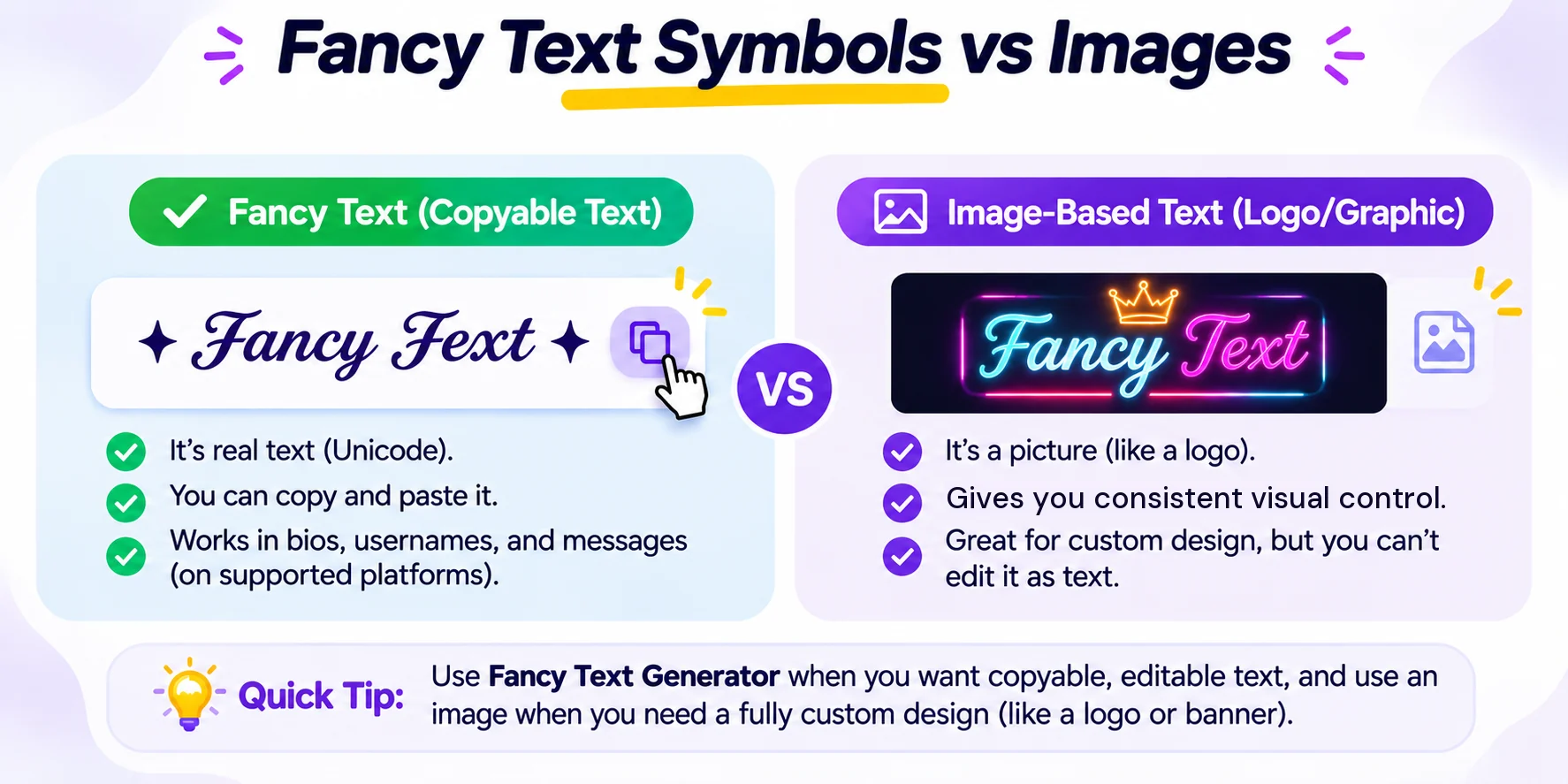
Fancy text is useful when you need actual text that people can select, copy, and paste. Images are better when you need complete control over the visual design.
For example, if you want a logo with a specific font, colour, outline, shadow, and layout, an image gives you much more control. If you want a username that someone can copy and paste, Unicode text is usually more practical.
Use the right format for the job.
Try Fancy Text Symbols Yourself
You can create your own copyable styles with our Fancy Text Generator. Type a word or short phrase, browse the available styles, and copy the version you like.
For more specialised styles, explore our companion generators:
Remember that compatibility can vary. Always check your final text in the platform where you plan to use it.
Frequently Asked Questions
Are fancy text symbols actual fonts?
Usually, no. Many fancy text generators use Unicode characters or combinations of characters to create different visual effects. A font affects how characters are rendered, while Unicode provides characters that software can interpret and display.
Can I copy and paste fancy text?
Yes, many Unicode-based styles can be copied and pasted as text. However, the destination platform must support the characters for them to display correctly.
Why does fancy text look different on another device?
Different devices, operating systems, browsers, applications, platforms, and available fonts can render the same Unicode characters differently. Some characters may also be unsupported in a particular environment.
Can I use fancy text in a username?
That depends on the platform. Some services allow many Unicode characters, while others restrict the characters that can appear in usernames. Test the name before using it permanently.
Are Unicode symbols free to use?
Unicode is a character encoding standard, and the Unicode Consortium provides the standard for use without requiring individual permission to use its encoded characters. However, this does not mean that every font, graphic, or third-party asset containing those characters is free to use. A font or graphic can have its own licensing terms, so check the relevant licence before using third-party assets commercially.
Why does some fancy text look like a different font?
Some Unicode characters have visual forms that resemble familiar type styles. When you copy those characters, you are copying the characters themselves rather than applying a font to ordinary letters.
Final Tip
Fancy text works best when you use it with a purpose. A few symbols can make a username or bio easier to notice. A simple stylised word can give a profile a different look. Too many unusual characters can make text harder to read.
Try a few styles, copy the one you like, and check how it appears on the platform where you plan to use it.
Sources and References
This guide was developed and verified using technical documentation from authoritative standards bodies and search guidelines:
- Unicode Standard, Technical Introduction – Official principles and character architecture from the Unicode Consortium.
- Unicode Standard, Core Specification Chapter 1 – Overview of character encoding, glyph rendering, and character vs. font design.
- Google Search Central, Creating Helpful, Reliable, People-First Content – Best practices for user-centric, technically accurate digital content.